New Tool Release: Bluesky Live

Bluesky Logo

Somewhat recently Bluesky added the ability to mark/set yourself as Live on Bluesky and link out from Bluesky to a given service. At the moment that is a short list of services, but includes Twitch and Stream.place among others.

If you were to set yourself as Live manually on Bluesky, you are maxed to 4 hours, so you would need to remember and come back to bump your time or manually remove the status if you ended before 4 hours.

Given Bluesky oAuth is a thing, and because App Passwords are not tooooo much fun with work with IMO, so I built a tool to implement Bluesky oAuth as an adventure in how Bluesky does oAuth (thats likely gonna be a separate post as it’s pretty interesting and in depth).

I’m still tweaking/optimising how my code runs as there are some caching layers that could be added to speed up operations, but I digress!

AND SO via the powers of Twitch oAuth and Twitch eventsub, pair the two services together to do Bluesky Live AUTOMATICALLY! (Anyone using Stream.place it’s native to the platform)

MAGIC!

The only drawback is that Bluesky oAuth is a smidge brittle, as outlined in this Issue on GitHub I authored, even when you have your Client configured as confidential. And understanding how scopes work is FUN! (Follow up post soon)

Well what does it do?

First of all it handles the 4 hour max issue, by “bumping” the expiration time automatically whilst the Twitch channel is live. As well as:

When you go live on Twitch

  • Mark your Bluesky as live with a link to your Twitch
  • Applies your stream title as the title as Bluesky live entry
  • Applies your stream thumbnail to the Bluesky live entry

When you change your Title or Category

  • Applies your new stream title as the title as Bluesky live entry
  • Applies your new stream thumbnail to the Bluesky live entry

When you go offline on Twitch

  • Delete the live status

Periodically/every 15 minutes

  • Updates the thumbnail from Twitch to Bluesky
  • Updates the title from Twitch to Bluesky
  • Rebump the expire timer
  • Sanity check and remove the status

But wait, there’s more

Yes there is MORE!

Kylo Ren yelling MORE on loop
MORE!

Since this tool pairs your Twitch account with a Bluesky Account, when the job runs to maintain Bluesky live status, it can see if you are live elsewhere (manually set or auto set by another service), if that elsewhere is not Twitch then I won’t overwrite or attempt to manage it.

But, if it IS Twitch, then I’ll maintain the live status (and the thumbnail), so if you manually marked yourself as live on another channel, the tool will maintain the thumbnail and expire timer till that channel goes offline (or you manually remove it) which is great if you are guesting on another stream, or doing a Dungeons and Dragons show for example elsewhere on Twitch when it’s not dual streamed to your own channel.

Why 4 Hours

No idea, but on the upside it does mean that if the oAuth breaks due to the brittleness or other reasons, and the tool cannot write to your Bluesky account any more, the status will self disappear on its own.

Then you just need to reauthenticate to the tool and away it goes

Ok, let me use it

You can find the tool over at https://bluesky.chatbot.barrycarlyon.co.uk/ and it comes with the bonus of listing who is live using the tool! FREE DISCOVERY!

Starship Discovery care of https://memory-alpha.fandom.com/wiki/Star_Trek:_Discovery

And yes it works with custom Bluesky handles, like mine barrycarlyon.co.uk and should work with ANY PDS (personal data server).

Support can be found via my Discord, check the site for the invite link down the bottom right, and/or support the tool via my ko-fi! Or drop me a line thru the usual channels.

Free support methods? Well retweet/repost the Twitter or Bluesky posts about it! (or the ones about this blog post that I don’t have the links to yet!)

A screenshot of the Tool showing a handful of live streamers on Twitch whom are using the tool.

Fun with WP.me and Twitter Cards

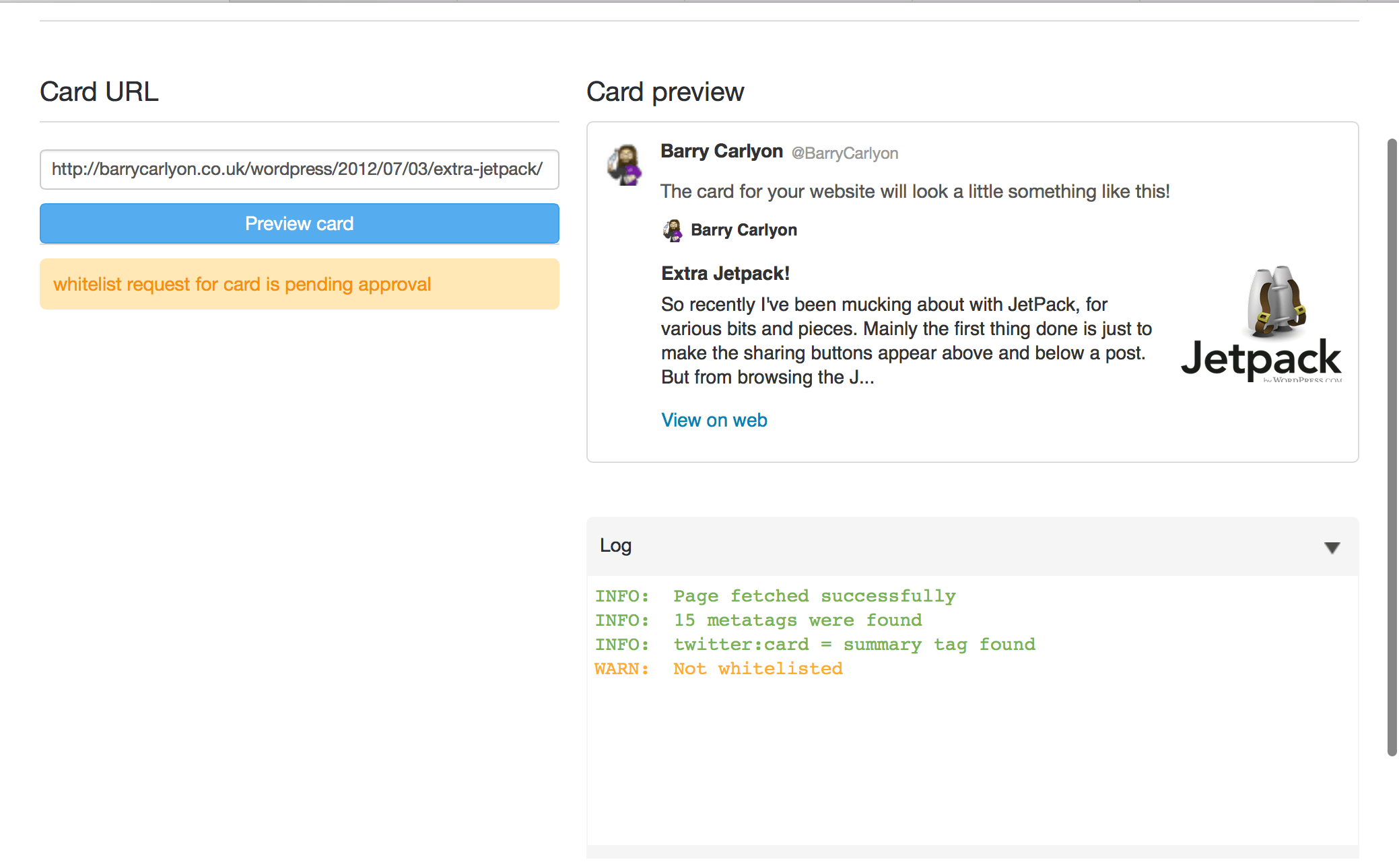
I was trying to figure out why my Twitter Cards weren’t working when I was tinkering with someone else’s WordPress install.

Turns out at some point Twitter decided to follow the WP.me redirect and grab the page behind is differently.

So, now you need to whitelist your domain rather than WP.me.

To do that pop along to The Card Validator with one of your none WP.me Blog Post URL’s in hand and pop it in the validator box.

twitter_card_validation

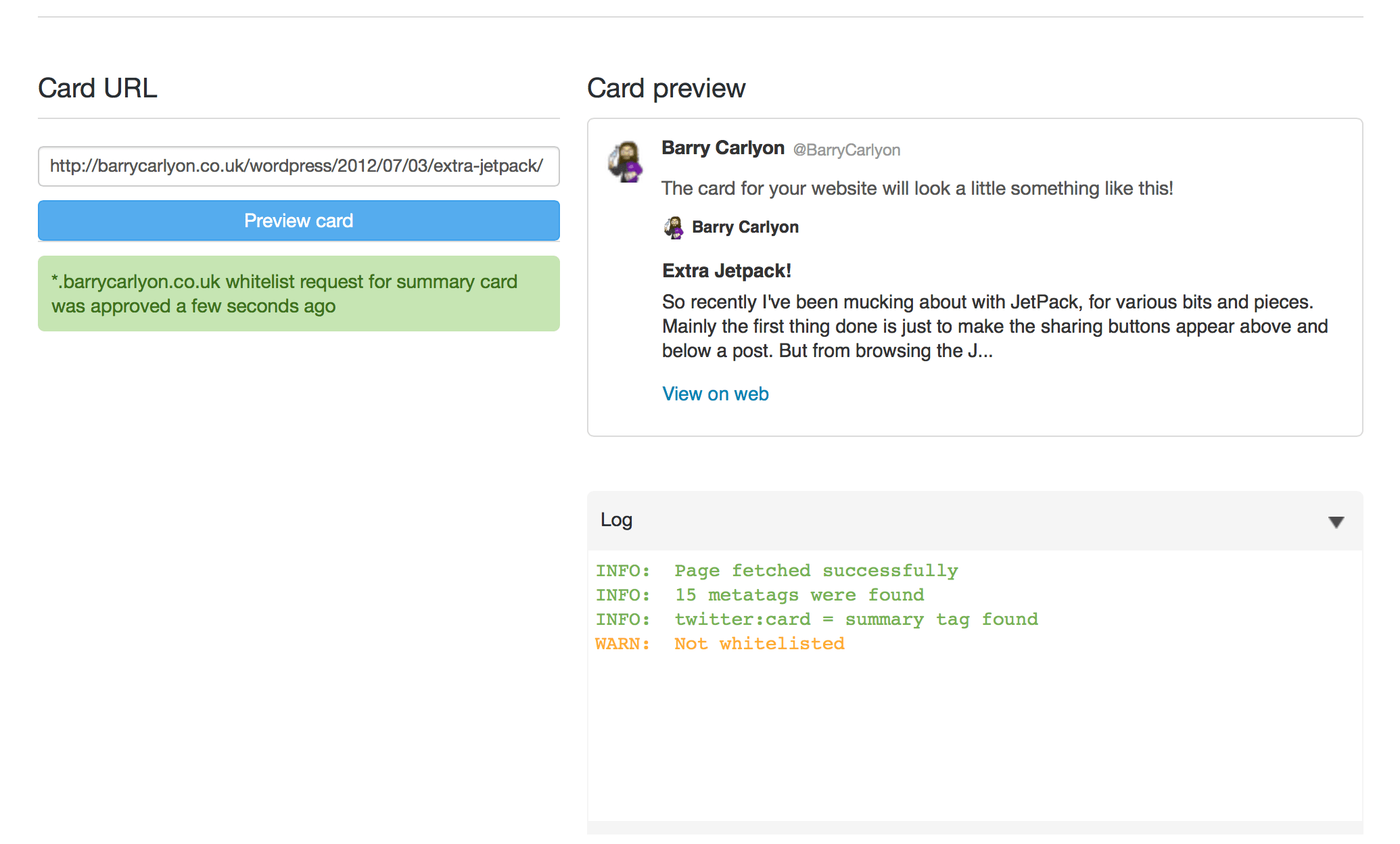
Click request approval, fill in the little form and wack submit! It might throw an error but retest your page and all should be good!

pending

Give it a few minutes:

waiting

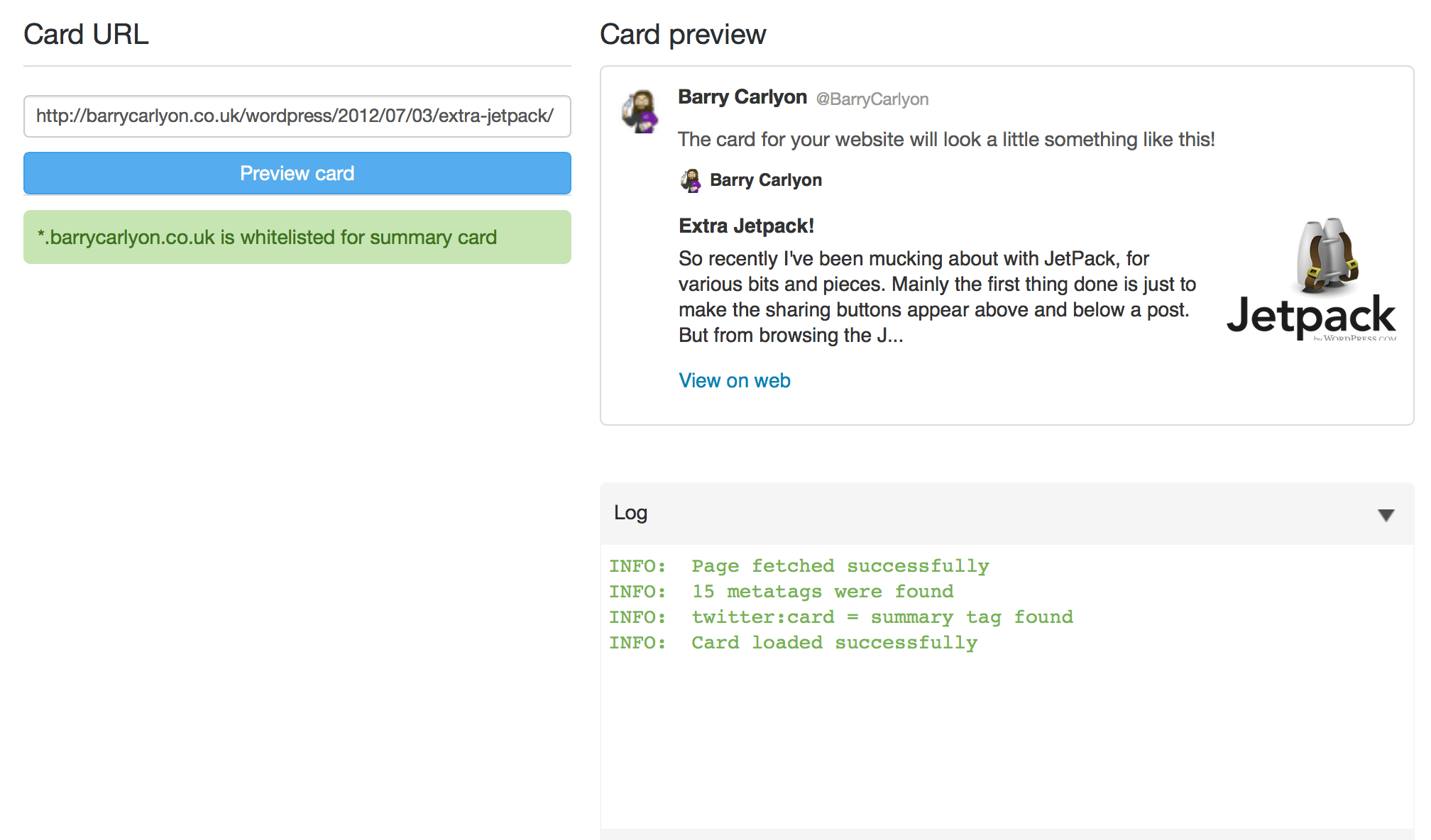
And Finally:

finally

A working Tweet!

Updated like so:

Barry_Carlyon_on_Twitter___Fun_with_WP_me_and_Twitter_Cards_http___t_co_WYcrgwtMgG_

My Leeds Hack 2 Project

Thought I would write a blog post about what I built in 24 hours for Leeds Hack 2 last weekend. I kinda got distracted last week and not had the time to write this post.

You can look at all the projects that people finished over on the Leeds Hack Website.

So what did I write

I decided to write something that I had been pondering about for a while. It’s called Spotify Roulette and revolves around the idea of crowd sourcing a new artist or area of music to listen to.

Originally it started off with me posting on Twitter quite a while back asking for something new to listen to, to which @Stanton responded with Hybrid. (I can’t find the original tweet on twitter but it’s here on Spotwitfy) Which are actually quite nice to listen to and I have a nice Spotify playlist to listen to.

I was wondering if there was a way to automate this.

So thru the combination of the Twitter and Spotify Meta Data API’s, means I can post out to Twitter, await a response, parse out the Artist and then pop open Spotify with a random track by that Artist and if the requester wants a playlist can be generated, and thru a limitation in Spotify, drag and dropped into Spotify to listen further to the Artist.

In short

In short its pretty straight forward.
Just a handful of calls to a couple of different API end points to get an Artist ID from the name, then their albums and the tracks on these albums. Chuck in a little GeoIP to hopefully check the tracks are available in the requesters’ region.
Grab the first track, pop open Spotify and grab another 10 tracks to make a playlist.

Finally I used Nerf Guns to help demo! Russian Roulette stylee.

Responses

People on Twitter can either response with text, an artist which we parse out the @user and the hashtag word. Then look that up on Spotify.
Or a response can be either an HTTP open Spotify link or a Spotify protocol link. Either to the artist page, track or album.
if it’s the Artist, I can parse out the artist ID and look for albums and tracks.
Currently not playlist urls, but that’s easy to implement.

Technology

So we used,

  • Twitter API, using @Abraham Twitter oAuth Library
  • Spotify Meta Data API
  • MaxMind GeoIP
  • jQuery and jQuery UI
  • Rick Astley
  • Nerf Guns

Give it a Go

Give it a go and offer me some feedback.
Watch out for Rick Astley tho. He likes to crop up every now and again….

It’s still a little rough round the edges in terms of theme/layout.

Spotify Roulette (http://spotifyroulette.com/)

Future

Hopefully if people like it and use it I can expand further.

Perhaps use Facebook to share playlists, or another way to crowd source a new artist. And if Spotify release a HTTP API for generating and saving playlists then incorporate that too.

Some Random Useful Things

Some random useful things:

Twitter, is scrapping Basic Auth! Which means no more simple curl calls, its on to OAuth.

Check out http://dev.twitter.com/pages/basic_to_oauth for how to update your Apps/Usage, and http://countdowntooauth.com/ for a handy countdown.

In other twitter news, I use Notifo to forward my twitter replies to my iPhone, which uses Push.ly to grab the stream. Twitter has currently borked @Replies both in apps and on the website, however Notifo announced they have updated their website with a new design, (hurrah), and a desktop client (further hurrah).
So with my mac and growl I now get Growl @ Responses….. SUCCESS!

Thats enough twitter! I was linked in a random IRC channel to http://jsfiddle.net/, which is a sort of real time code and run/test interface for several different javascript libs, including MooTools, and jQuery. Its currently in Alpha and under “heavy development”, so far I have found it quite useful, since it saves a lot of time in prototyping something. Looking forward to when they add user accounts, will be easier to track my own fiddles, heres the 5th version of me fiddling with jQuery UI tabs yes it has basic version control!

Facebook next, came across this today: http://developers.facebook.com/roadmap pretty much nails the coffin shut on FBML and suggests that we will all be using iFrames instead….

Not sure if this is a good thing or a bad thing, since iFrames are not always the most secure of things, but will make sending more upto date stuff to a Facebook page easier. And no longer stuck with Facebook caching, which in itself is a useful thing….

Also they are moving to a larger oauth setting with the use of oauth version 2! And scrapping their Rest API.

So there is a lot of change going on within two of the larger things I have been involved with (in terms of building things for clients), so in this vein when is the Last.FM api moving to oAuth too, tho it does use a token based Auth now?!

I’m gonna need to do a lot of recoding/refactoring for things that use FBML and basic Auth….

Is oAuth the future for all API’s? What do you think?

Edit:

O and I am going to invest in one of these!

Twitter @Anywhere, and the End of Halo 2

So there I was last night, watching Justin.tv. a couple of streams, a Live Halo 2 stream and live coverage of Chirp, the Twitter Developers Conference.

My net was actually behaving for once, watching two Justin.TV streams, sending and receiving a Skype video chat, as well as uploading tracks to the LSRfm.com Jukebox.


Today is the final day of Xbox Live existing for Original Xbox and Original Xbox Games, most predominately Halo 2, what this means is that you can still play the game locally, but you can’t go online via Xbox Live and play match making/custom games. They are going to turn those servers over to the Xbox 360 Network. Bungie News article about the end of Halo 2

So, no more Halo2, unless you’re a Xbox KAI user for example or LAN PARTY!!!!

I have been up all night and as of 9am BST (+1) this morning, the servers are still on, so get you’re Halo 2 on!

Back to Twitter/Chirp, Twitter has launched their new Developers website, which essentially brings together the API documentation, the Oauth application registration, and API status pages to a single location.

Twitter also spoke about @Anywhere which essentially allows you to integrate some aspects of Twitter into your website, thru the use of a single javascript call.


You can allow users to tweet from your website, automatically convert any @username to the new hovercards. See the example from @abraham on (His Site).

And then allow users to follow you, without bouncing to twitter, other than a popup to authenticate you to twitter and allow the Anywhere App access.

Check Anywhere out at http://dev.twitter.com/anywhere/ and checkout what The Guardian are doing with it.

On a unrelated point, when you login to Justin.TV via twitter, it is automatically posts anything you put in the video chat box, to your twitter account, along with links to what you are watching, bit of a spam fest, if you a) don’t know about it and b) forget to turn it off. But it led to this: Read and LOL