- Current Version: 1.0.6.2 (Updated: 2013-12-15 11:46pm GMT)
- Rating: 5 Stars
- WordPress.org URL: wp-zombaio - Support Forum
- Download: From Extend (3660)
- Requires WordPress 3.4.2
- Tested Up To 3.7.41
This Plugin allows Site Admins to easily configure and use the Adult Payment Gateway Zombaio for use with WordPress. In a more Secure and WordPress-y way that the existing recommended script.
Two ShortCodes help to make joining the site and displaying the Zombaio Site seal as easy as possible.
As well as logging transmitted data from Zombaio as a Custom Post Type.
Currently only User Add, User Delete and User Rebill are Processed.
But all data is logged.
In the future, Credit Purchase will be supported.
When a user delete/cancel occurs, the admin can choose whether the User is deleted from WordPress or just suspended from being able to login.
This plugin works with “Anyone can register” disabled, stopping users signing up without using a Zombaio based Join Form.
Built in Splash Page/redirection allows you to redirect logged out users to a WordPress Page of your Choosing, thus protecting your content from non members, as well as giving you the ability to warn users about the site content, or create a suitable “Join my Site” page. You can also choose pages that are unlocked/open to all users. For tours etc.
See Other Notes for Usage/Instructions
Help
For Extra help/support or otherwise, either use the WordPress Support Forum, or Drop Me a Line
You can also reach out to us on Twitter!
Whats Coming Soon
- Credit Purchase and Spending there of
- Flexible Protection
- Suspend a User Manually
Usage
With the block enabled, only the landing page is accessable, and users are forced to login or register.
You can run with Anyone can Register turned off, which means users can only use your Landing page, or the Zombaio Join Form/Widget to Register.
You can refer to the in plugin guide, which contains lots of setup information, settings notes and advice.
The Plugin provides three Shortcodes which are also available as Sidebar Widgets.
The first being the Zombaio Site Seal, which you can enter in the settings and then quickly add it where needed.
[zombaio_seal]
ShortCode Arguments
- align – save you having to wrap it in a div, you can use left, center or right to control page placement
The second being, the Join Form.
[zombaio_join]content[/zombaio_join]
ShortCode Arguments
- join_url – the Zombaio Join URL for the relevant subscription
- submit – the text to use on the Submit button
- align – save you having to wrap it in a div, you can use left, center or right to control page placement
- buttonalign – save you having to wrap it in a div, you can use left, center or right to button placement
- width – the Form Width, just a number
ShortCode Content
The shortcode content is added to the form beneath the password field and the join button.
The third and final item is, a Login Form.
[zombaio_login]
Renders a login form, also available as a Widget
- Download the Plugin from Extend
- Unzip the Zip File
- Upload
wp-zombaiofolder to the/wp-content/plugins/directory - Activate the plugin through the ‘Plugins’ menu in WordPress
- Use the Wizard to quicky run thru the setup and get everything going
- Add the SideBar widget, or use the ShortCode to add a Join Site form.
Do I need the ZScript script?
No, this is a replacement for the downloadable ZScript and the “Standard” Zombaio .htaccess/.htpasswd Protection. Existing ZScript protection should be removed
What Details do I need for this Plugin?
Just the ZombaioGWPass (aka Digest Key) and your SiteID.
SiteID’s are specific to each Site/URL you add to the ZOA Website Manager.
We do not need your Account User name/login or Password.
What settings do I need in Zombaio ZOA
If you follow the Wizard inside the plugin it will guide you thru the setup and settings to use.
What about the Zombaio Seal Code?
We provide a shortcode and widget to display the Seal on your website, and instructions on where to obtain your code.
I need help!
Either use the WordPress Support Forum, or Drop Me a Line
1.0.6.2
- Fix a bug involving User Suspension/Deletion (reported by Jose Angel)
1.0.6
- At the request of Sam Rockhard owner of New Market Media, added the ability to unlock pages
- Adds a option to the Admin Settings Page to enable/disable redirect off the home page
- Changes the pick a page to redirect to, to the better interface
- Adds a Meta Box to the post/page editor to make that post/page public (no need to set this on the target page)
- You an unlock a page/post by editing it and set “Allow access to All” to Yes
- Tested with 3.6 all seems good
1.0.4
- Tweaks to the Validate ZScript Code
- Actually fixed IPN IP Verfication so it actually works
- Accept and log chargebacks and declined messages
- New/improved logging interface
- Added the Guide
- Added notes on Caching Plugins and CloudFlare
- Improved the interface and layout (somewhat looks a little like Zombaios ZOA interface)
- Internationaslised the plugin/added translation support
- Added a Login Widget
- Added Login block, and the abilty to redirect users to a “Landing Page”, default is the WP Login Page.
- [zombaio_join] shortcode supports additional arguments:
- align – form placement – choices: left center right
- buttonalign – button placement – choices: left center right
- width – form width
- [zombaio_seal] shortcode supports additiona arguments:
- align – placement – choices: left center right
- Added Shortcode [zombaio_login] renders a basic Login Form, its also a Widget
1.0.2
- Prettification (logo/icon)
- Added a Notice/warning when Anyone can Register is enabled.
- Fix a UI glitch when the sidebar and/or one or more forms are on a screen
- Stop Passwords being double hashed (and confusing users at login) as the selected Password won’t work
1.0.0
- Initial Release
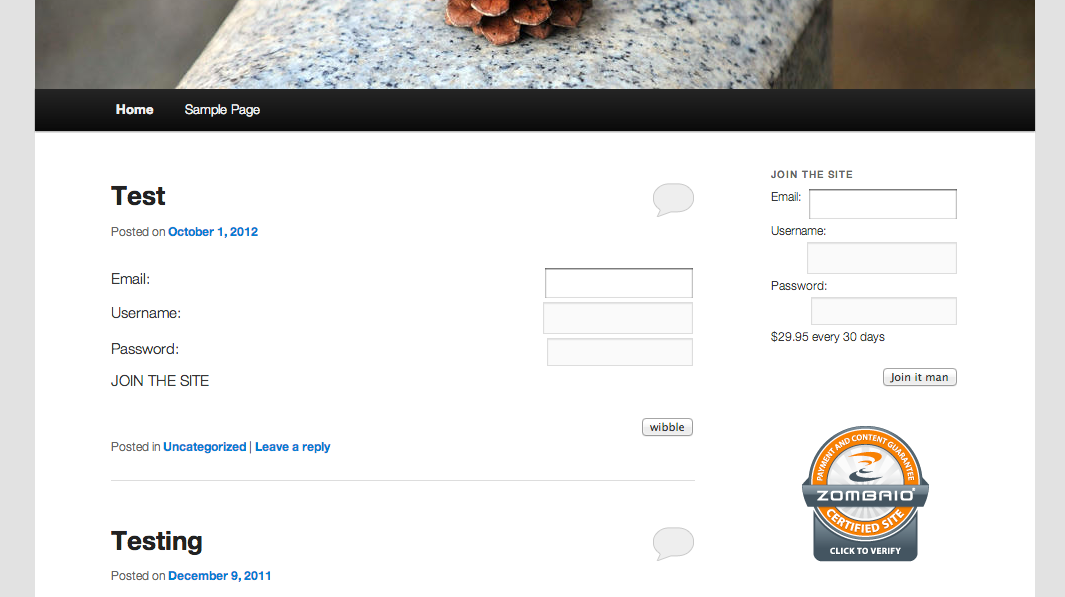
The ShortCodes and Widgets in Action

Activating the Plugin

Wizard Step 1

Wizard Step 2

Wizard Step 3

The Settings Page in Full

WP Widgets Page

Logs Interface

Page Edit - making a page public


Record Updated: 03:45:46 03/07/2025
Hi
Looking to start up an adult site using Zombaio and found your plug in which I would definately use. I have a couple of questions if you don’t mind ……
Can I only have 1 splash page? I would like some of my site available to non-members and some to members only – can I have this? I think this is what you may mean by Allow Pages?
Ultimately, I would like to offer Pay-to-view (with various options), rather than a timed subscription – for both still galleries and streaming video content – is this something you may be looking at for the future?
Regards
Hi there,
Currently the plugin only has one none protected/splash page. (The splash page itself also can be used to act as the first landing page for the Adult Content warning which was the initial aim of this functionality, but then I realised the need for an amount of free access to guest users)
The next release that I am working on will allow more “free access” pages, so yes that is what I mean by “Allow Pages”
Pay Per View is also possible and coming in the next release.
The only restriction with Zombaio, is that Pay Per View, normally works thru the exchange of Credits, and to purchase Credits via Zombaio, the person needs to be a member of your site. And to be a member of your site, they need to have paid a one off subscription free (or a recurring subscription fee)
From Zombaio Documentation “Since this is a purchase of credits we assume that the cardholder is a [i]current member[/i] on your site and does not need to choose a username and password, as with the recurring billing option.”
And its a little difficult to run a free membership, as it’s not “out of the box” with Zombaio. As Zombaio itself doesn’t do a Free Subscription, (it does do a one off site access). And handling guest purchases can be even more of a pain, as it is much easier to track a logged in user than a logged out user, let alone the afor mentioned notes from Zombaio Documentation.
The solution here perhaps, is in Zombaio Create a Join Form/Pricing Structure that is non recurring to access the content, which will create them as a member, and then from there purchase credits for additional oher content access (this might lead to confusion for users however, since the first payment to access content is with money and each subsequent is bought with credits).
But the next release will have the additional functionality to allow users to buy credits via Zombaio, and then exchange those credits on your site, for post access, this access can be timed, (so pay per view) or forever access.
This plugin replicates what Zombaio’s normal Z-Script does, with its .htaccess protection. But with the shinyness of credits.
Zombaio has recently added new options/methods and functionality that I need to investigate and see what can be used in this plugin to run an effective membership site.
At the moment any Paid Freelance work I have has to come first, since I normally build this plugin in my free time (the next plugin release was planned last week, but I’ve just not had the time to finish and release it)
If it’s something specific you are looking at that doesn’t quite fit the current or planned functionality, please feel free to drop me a email with more details and I can write up a quote and/or investigate the options more fully!
Hey Barry, any news on the latest update or are you not working on it anymore? Really interested in this could even be worth something. Many Thanks.
Hi Ryan,
Thanks for getting in touch!
There is a update coming. Most likely a small one this weekend.
I’ve recently moved home and jobs, and only just this week got my internet up and running, so I’m a month behind in non day job work in general. And I have to catch up on some paid work before I get on with Free stuff (which is where WP-Zombaio lies unless someone pays for some development time).
If you have something specific you need please drop me a line via the contact form. As I have done a couple of small WP-Zombaio bits for people who have dropped me a Line.
Hi Barry. I am using WP-Zombaio three months ago. Everything went perfect.
But two days ago I installed Cloud Flare and users are not automatically created.
In Zombaio says “Warning, CALLBACK errors! Retrying”
Cloud Flare uninstalled already but I still have the same problem.
Do you have any idea how I can solve it?
Thanks Barry!
PS: Payments are received correctly.
First off Zombaio is still having callback problems because, CloudFlare involves a DNS change, and Zombaio is still using the old records. (This will clear in time but can take anywhere between 1 hour and 1 week to propagate properly across the internet)
If you want to use CloudFlare you need to follow the instructions in the plugin guide about CloudFlare Whitelisting. (WP Zombaio Menu Item -> Guide)
“CloudFlare Whitelisting, visit Threat Control add Custom Rule, and Trust all the Zombaio IP’s”
In the guide you can also get the list of IP’s to Whitelist, which you will also need to periodically check and update CloudFlare accordingly when Zombaio updates/changes it’s IP’s which thankfully is rare.
Hopefully this will then let Zombaio bypass CloudFlare, and the notifications succesfully reach WordPress an WP-Zombaio.
Barry, thanks so much man!
hello
zombaio asks me the username and password of members to activate a site like I do? I create a user and a page?
the message of zombaio:
You have to Provide us with a username and password to your current members’ area website for the review process. This must be a valid username and password That stays!
thanks
Zombaio needs to let them selves into your site, like a paying customer would, to confirm compliance and things. I’m unsure of the exact parameters of why, thats a question for Zombaio themselves.
ok thanks but the credits are supported?
thanks
Credits is coming in a future release. Perhaps as a paid add on. I’ve not had time to finish the support as it’s a large update to the plugin, and I do this plugin for free, so paid work comes first.
ok thanks
I am looking for woocommerce extension, do you have any plan to built it?
I am planning at looking at doing a WooCommerce extension. It does seem fairly straightforward! No timelines yet!
Hello Barry,
I have some questions about the WP Zombaio plugin. Have emailed you a couple of times, but haven’t heard back yet.
Hope to hear back, and hope all is well.
Thanks
I’m all caught up now, so you should have a response from me!